Accept payments online
Connect Stripe or PayPal so parents and students can pay securely online.

Accept Stripe or PayPal, automate billing, send invoices, and stay on top of overdue and future payments — all in one system.
Teach ’n Go helps schools and training providers manage school fees, online payments, invoices, discounts and overdue payments in one clear, secure workflow.
No credit card required.

Connect Stripe or PayPal so parents and students can pay securely online.
Set pricing once — Teach ’n Go calculates what each student owes automatically.
See payment history, overdue balances, and future payments at a glance.
Set course prices, apply discounts, collect payments, and generate invoices — without spreadsheets or manual tracking.




Teach ’n Go helps you collect fees and track payments with less admin — and more visibility.
Teach 'n Go allows you to easily manage your school's finances by setting course prices and additional fees, selecting payment processing and payment options, and keeping track of paid and outstanding invoices.
Thanks to the streamlined payment system our platform provides, manual data entry and additional managerial hassle are completely eliminated. Additionally, you don't have to look for a convenient and secure way to accept payments; Teach 'n Go integrates with numerous payment solutions, such as Stripe, Paypal, or credit card/debit card payment options, and handles all the transaction details for you.
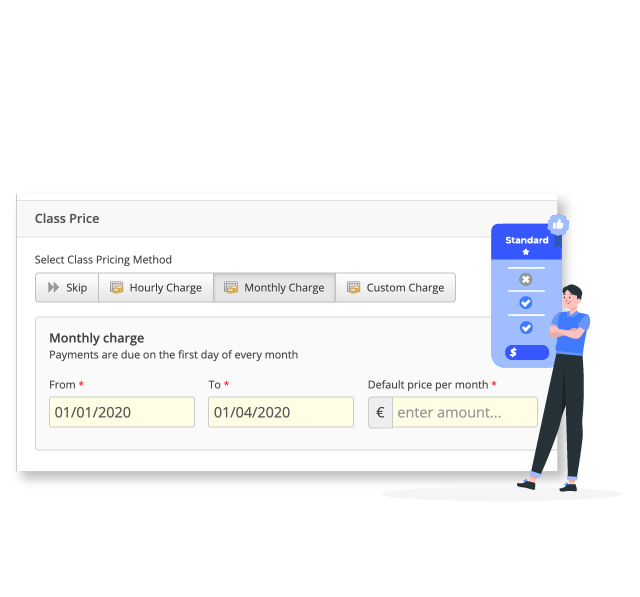
Apart from payment collection, our payment system allows school administrators to set course prices per hour, month, or custom parameters as a one-time or recurring payment. It also does all the math "under the hood" and calculates how many remaining installments or fees individual students owe in tuition fees and other due payments.
Additionally, the online school payment system is fantastic for automating late payments—the tool will rely on the implemented messaging system and student information system to notify students and their parents that their payments are past due.
Here are some of the most frequently asked questions about our fee payment system:
An online school payment system lets parents and students pay school fees, including tuition, lunch money, and other school-related expenses. These software solutions also provide educational institutions with insight into their complete financial performance and payment history while enabling them to send and receive invoices and set up automatic payments.
Yes, there are usually transaction fees associated with school payments. Those fees can vary depending on the provider, the type of payment, and, quite possibly, the transaction amount. Additionally, those fees are usually paid by the students or their parents, regardless of the payment method.
Yes. You can connect Stripe or PayPal so parents and students can pay online securely. Once connected, payments and statuses are recorded automatically in Teach 'n Go.
Yes. Teach 'n Go supports hourly, monthly, and custom pricing methods. Pricing and due dates can be applied to students automatically based on their enrolments.
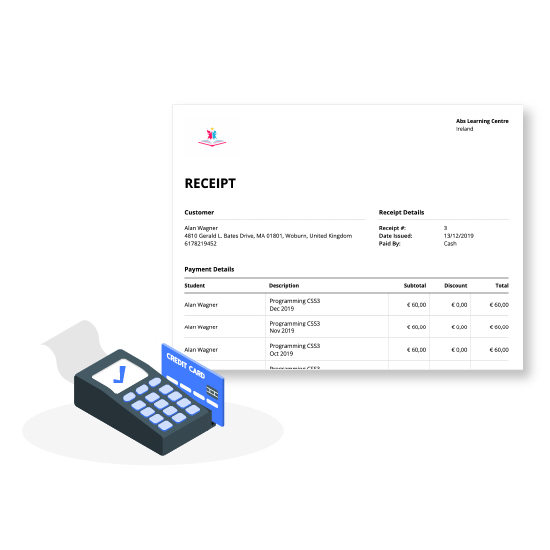
Yes. You can create professional invoices and receipts, then save, print, or email them to parents and stakeholders.
Yes. You can add discounts to a student's fees and apply course discounts from the student's profile so billing stays accurate.
Teach 'n Go helps you view overdue payments in one place and send reminders, so you can follow up without manual tracking.
Yes. You can view payment history per student in real time and browse future fees by student, payment method, due date, and discount.
In minutes, build your first class and share it with your teachers. No credit card required.
In 30 minutes, we’ll show you how Teach 'n Go can transform your school or training centre.
Teach ’n Go is more than online school fees software. Schools and training providers use it to schedule classes, track attendance, manage student records, and keep communication organised in one connected platform.
Build timetables faster, prevent conflicts, and keep staff updated in real time.
Explore scheduling →Mark attendance faster and keep reports accurate across classes.
Explore attendance →Store student records in one place — searchable and easy to update.
Explore student records →Send updates to teachers, students, or parents without follow-ups.
Explore messaging →